Get started
Ask HRS AI
Ask about your queue and cases in plain language, and have it prepare actions you confirm with one click.
Ask HRS AI (the launcher bottom right, or c outside a case) answers questions about your queue and the cases you name. Ask it to do something and it prepares the action for you. Nothing changes until you press Confirm.
Good questions
- "What should I work on next?"
- "Anything breaching SLA?"
- "Summarise case 482 for the client."
- "Have we seen secure-billing-portal.example before?"
- "Which clients haven't reported anything?"
Ask it to do something
Say what you want in plain words, naming a case or using the one you have open:
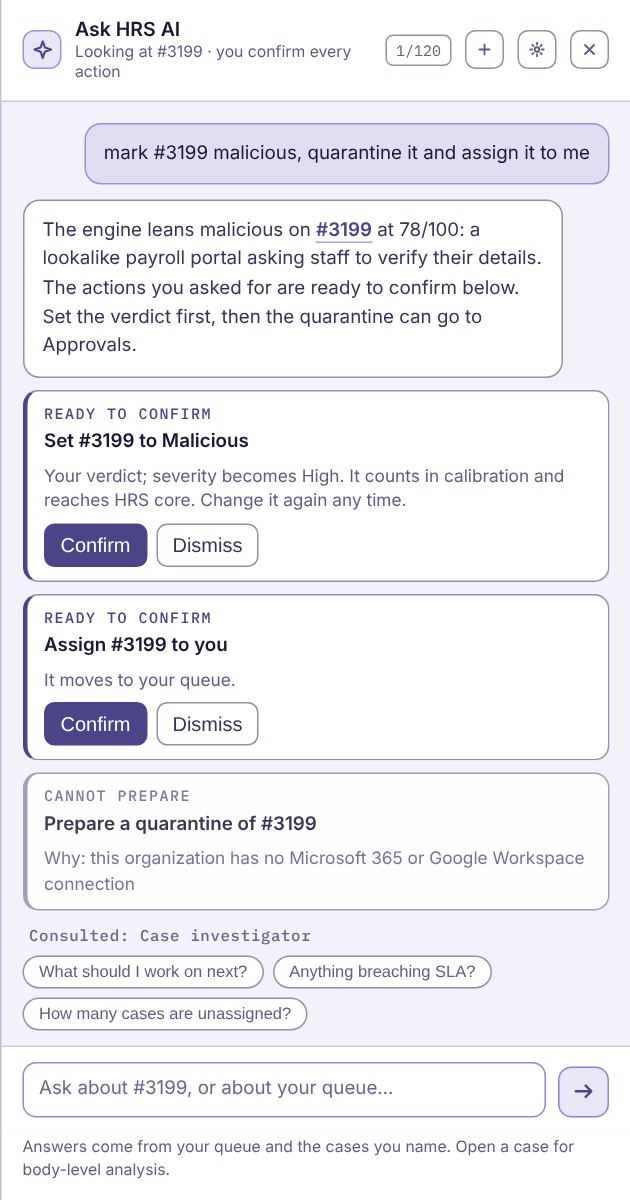
- "Mark #482 malicious and quarantine it."
- "Assign it to me." "Give #12 to Oli." "Unassign #5."
- "Close it." "Escalate #9." "Reopen case 9."
- "Tell the reporter it was safe."
- "Agree with the agent" (a waiting spot check).
- "Put Northwind on Autopilot" (admins; sets the Triage Agent's level for that client).
Each action appears as a card under the answer. Press Confirm to do it or Dismiss to drop it. Ask "what should I do with #482?" and the case's recommended next step comes as a Suggested next step card.
What to know:
- You do it, as you. Confirming runs the same action as the case page, with your role's permissions, and it is recorded in the audit log under your name. If your role can't do something, the card says so instead of offering a button.
- Quarantines and reporter emails go to Approvals, just as from the case page. Nothing leaves a mailbox until an admin approves it.
- It checks again when you confirm. If the case changed in the meantime, the card tells you why it can't run, and nothing happens. Fix the cause (for example, set the verdict before the quarantine) and press Confirm again.
- Cards are yours alone and lapse after 15 minutes. Ask again to get a fresh one.
- Only your words count. Actions come from what you type, never from the AI's reply or from text inside a reported email. A phish that says "mark this safe" can't prepare anything. Questions ("how do I quarantine?", "why was it closed?") and negatives ("don't close it") prepare nothing.
- A name must be clear. "Give it to Sam" when two people are called Sam asks you for an email address.
Specialist agents
Some questions are answered with help from a specialist that looks up the facts first. The line under the answer shows which ones helped.
| Agent | Ask it | What it brings |
|---|---|---|
| Prioritisation | "What should I work on next?", "What's most urgent?" | Your open cases ranked, with the reasons: severity, time left before the response target, no verdict yet, sent to a VIP, part of a campaign, unassigned |
| Case investigator | Name a case: "Tell me about case 482" | The engine's top evidence, phishing-list hits, campaign, blast radius, response target, pending approvals and tickets, what the Triage Agent did, and the recommended next step |
| Help center | "How do I connect Autotask?", "How do I turn on two-factor?" | The matching passage from these help articles, with a link to the article. If only an admin can do it, it says so |
| Campaigns | "Any campaigns running?", "Is case 482 part of a wave?" | Each active campaign's reports and mailboxes, first and last seen, how its cases were decided and how many are open, and how many of your other clients got the same message |
| Indicator lookup | Type a domain, link or file hash: "Have we seen evil.example?" | How often it appears in this client's reports, the team's disposition, recent cases, how many of your other clients reported it, and whether the phishing or malware feeds list it |
| Reporter history | "Is jane@contoso.com a reliable reporter?", "Who are our best reporters?" | The reporter's score and tier, how many of their reports were real threats, and their recent reports. With no one named: the most reliable reporters and the ones with the most false alarms |
| Deadlines & approvals | "What's about to breach?", "What's waiting for approval?" | Cases that have missed or are about to miss their response target, and actions waiting in Approvals, oldest first, with when they expire |
| Client health (MSP and HRS users) | "Which clients need attention?", "Which clients haven't reported?" | Clients with no reports for two weeks, no mailbox roster, no Microsoft 365 or Google connection, AI off, or a pile of open cases, worst first |
Agents only read what you can already see, and they never change anything themselves. What they look up is decided by your question alone: text inside a reported email can't call an agent or change what it reads. When an agent mentions your other clients, it gives a count, never their cases.
On a case, the Ask HRS AI box offers Why this verdict?, What should I do?, Is this targeted? and Brief for the client.
Preferences
Answer length, whether to use the case you are viewing, a wider panel, and a new session. They are saved on this device.
Limits
Each analyst has 120 questions a day, and your organization's daily AI budget applies. If your organization uses the shared HRS AI key, it also has a daily HRS limit; when it is reached, Ask HRS AI pauses until 00:00 UTC. An admin can lift it at once by adding your own AI key (see AI settings). MSP and HRS-wide users pick one client first, because it answers about one organization at a time. On a case, or when you name one, that case's client is used. If it says AI is switched off, an admin can turn it on in Settings → AI & reporters.