Get started
How a reported email becomes a case
What happens between an employee pressing Report and a scored case appearing in your queue.
From the report button to your decision in seconds.
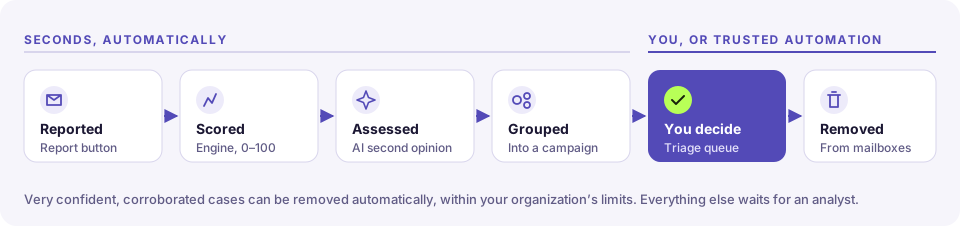
1. Reported
From the Outlook report button, a monitored mailbox, or the signed API. Auto-replies are ignored; "Fwd:" and "[External]" prefixes are stripped.
Each report carries your organization (and core's id for the reporter, so HRS core can credit them), so it is filed under your organization's name, and, if an MSP looks after you, lands in that MSP's portfolio from the very first report.
2. Evidence collected
Headers, links, attachments and QR codes are parsed. Near-identical reports join a campaign; links, domains and file hashes get reputation lookups, and every link is checked against the free threat lists. Downloaded feeds: OpenPhish, PhishTank, URLhaus, ThreatFox, Phishing Army and CERT Polska. Lookups: Google Safe Browsing and ThreatFox. A link on one of them is strong evidence even when the sender passes every authentication check. A match on a domain list (a listed host or its parent domain) counts for less, and never lets the Triage Agent act on its own.
3. Scored
A deterministic engine adds up evidence. Every point has a reason you can read on the case.
| Score | Verdict | Severity |
|---|---|---|
| 80+ | Malicious | Critical |
| 60–79 | Malicious | High |
| 30–59 | Suspicious | Medium |
| 12–29 | Needs review | Low |
| under 12 | Benign | — |
Confidence (low, medium, high) says how much independent evidence agrees. It isn't a probability.
4. AI second opinion
If an admin turns it on. Its influence is capped, and counts in full only when independent evidence agrees. Off or unavailable, the engine works alone.
5. Categorized
Every report gets a category, and the case says whether it was decided or not:
| Category | Means |
|---|---|
| HRS simulation | One of HRS core's own phishing simulations: the reporter spotted it |
| Business communication | Ordinary mail from someone you deal with |
| Spam / marketing | Newsletters, promotions, cold sales email |
| Credential phishing, Business email compromise, Malware delivery, QR phishing, Callback / vishing, Scam, Extortion, Brand impersonation, Thread hijacking | The attack families |
A category is decided only with enough evidence and a clear lead over the other kind of answer. A harmless answer (business or spam) also needs no threat signal at all, and a known relationship: a stranger's free email account is never waved through. When it isn't sure, the verdict becomes Needs review and an analyst decides; the case says why. A clear attack with a low score is raised to at least Suspicious. A categorization never lowers the engine's verdict.
An HRS simulation is recognized only when HRS provably sent it: from an HRS simulation domain with DMARC passing, or with a signed simulation header. A message that claims to be a simulation but wasn't sent by HRS is treated as an attacker's disguise.
The logic is backtested against a labeled set of reports, including hard cases such as phishing hosted on Google Forms or SharePoint and a known supplier's compromised mailbox; CI fails if it would close a threat or quarantine harmless mail.
6. Automation, within limits
Trusted rules may act on very confident cases. Mailbox actions need an approval unless the client's Triage Agent is on Autopilot, and VIP mail is never auto-remediated. See Automation rules.
7. You decide
The case lands in Triage with its score, reasons and evidence. Your verdict is final, and it teaches calibration how far to trust automation.